GGMauk · Twitch
Your live game stats, right under your stream
The GGMauk Live Card is a Twitch panel that shows your osu!, Valorant and CS2 stats on a card viewers can flip through. Rank, pp, K/D, playtime. It updates while you play, and the only thing you set is your username.
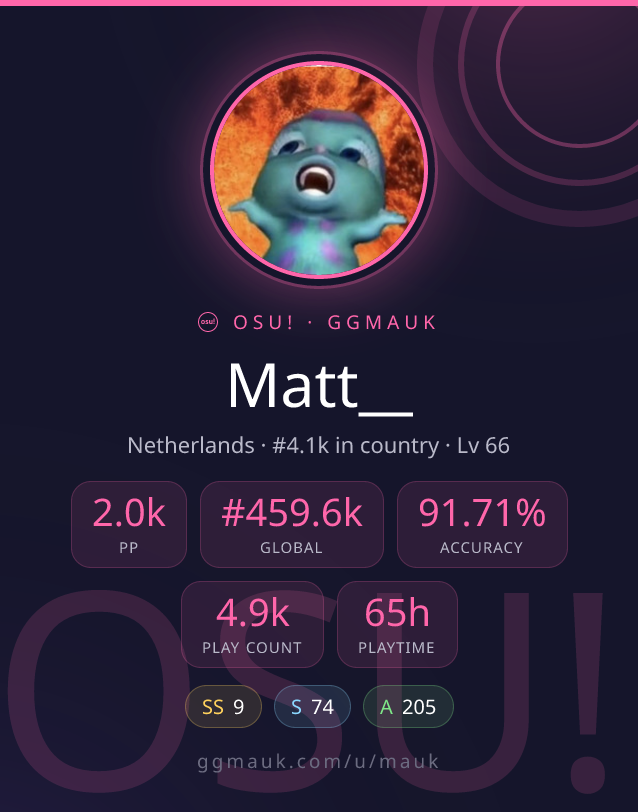
What it shows
Connect one game or all three. Each card pulls live from your public GGMauk profile.
osu!
pp, global + country rank, accuracy, play count, playtime, grade counts
Valorant
rank rating, win rate, K/D, KDA, average ACS, recent form
CS2
K/D, kills, headshot %, hours, round win rate, MVPs
How to add it
Install the extension
Add the GGMauk Live Card from the Twitch extensions list and set it as a panel on your channel.
Enter your username
Open the Configure screen and type your GGMauk username. If you do not have an account yet there is a link to make one.
Pick your games
Choose osu!, Valorant, CS2, or all of them. Save, and the card shows up under your stream. Viewers flip between games with the arrows.
Questions
What does the GGMauk Live Card show?
It shows your live stats for the games you connect. For osu! that is your pp, global and country rank, accuracy, play count and playtime. For Valorant it is your rank rating, win rate, K/D and recent form. For CS2 it is your K/D, kills, headshot percentage and hours. The card re-renders while you stream so the numbers stay current.
Which games are supported?
osu!, Valorant and CS2. You can show one game or several. When more than one is on, viewers switch between the cards with the arrow buttons on the panel.
How do I set it up?
Add the extension as a panel on your Twitch channel, open its Configure screen, type your GGMauk username, and tick the games you want. That is the whole setup. The card then appears under your stream.
Do I need a GGMauk account?
Yes, a free GGMauk account with your game accounts linked. That is where the stats come from. The Configure screen has a link to create one if you do not have it yet.
Is it free?
Yes. The extension is free, and so is a GGMauk account. There are no bits or paywalls.
Do my viewers have to do anything?
No. Viewers just see the card under your stream and can click the arrows to switch games. They never log in or install anything.